How to buy a competition entry
How to buy a competition entry
Short Answer
Log in to My Portal, choose the competition you want, review the checkout summary, and complete payment. After payment, the account still needs to be provisioned before you can trade.
When This Applies
Use this article when you are ready to enter MNQ Scale Cup or NQ Showdown and want to understand the checkout flow before paying.
Steps
- Log in to My Portal.
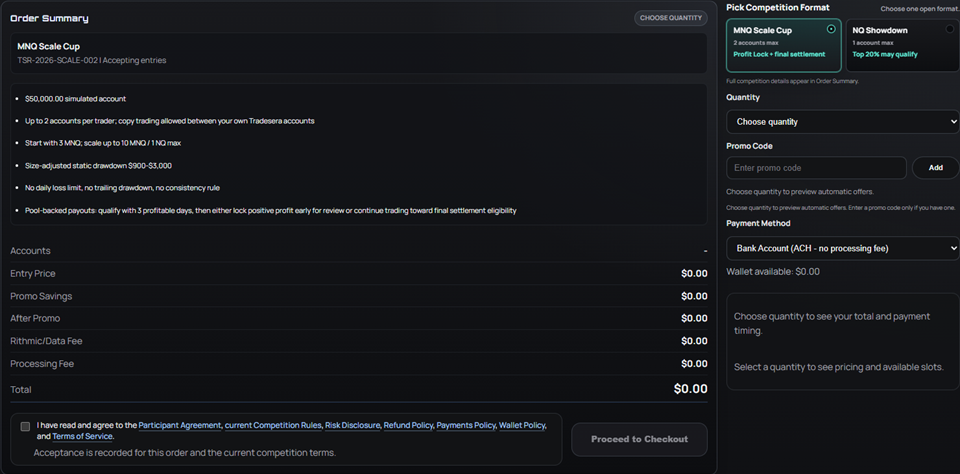
- Open the Join Competition area.
- Choose the competition format you want to enter.
- Select the account quantity if the product allows more than one account.
- Review the order summary carefully.
- Check any promotion, wallet balance, Rithmic/Data Fee, and payment fee lines.
- Read and accept the required agreements.
- Submit payment.
Before You Pay
Make sure the product fits what you want to trade.
- MNQ Scale Cup starts smaller and uses size unlocks.
- NQ Showdown is a weekly NQ-focused format with 1 NQ mode or 10 MNQ mode.
- Product rules, account limits, payout paths, and standings are separate.
If you are unsure, read the competition format and rules before checking out.
Common Issues
- The competition is not accepting entries:
Registration may be closed, paused, or full.
- A promotion did not apply:
Some promotions have product, timing, or usage limits. The checkout summary is the source of truth before payment.
- Wallet balance is not available:
Pending wallet credits cannot be used until they become available balance.
What To Do Next
After payment, watch the portal for the order and account status. The trading account may still show queued, pending, or processing while Rithmic provisioning completes.
Related Articles
- What happens after checkout?
- Why your trading account may say pending
- Where to find your Rithmic credentials
- MNQ Scale Cup overview
- NQ Showdown overview
Related Articles
Competition formats: MNQ Scale Cup vs NQ Showdown
Competition formats: MNQ Scale Cup vs NQ Showdown Overview Tradesera currently offers two simulated futures competition formats: MNQ Scale Cup NQ Showdown All trading is simulated. No live trades are executed, no customer funds are placed into ...Payout pool split explained
Payout pool split explained Short Answer The payout split applies to the competition pool, not directly to your simulated account profit. Your simulated result helps decide whether you qualify and how the pool is shared. The Simple Version Think ...MNQ Scale Cup overview
MNQ Scale Cup Start smaller, earn more size, and request Profit Lock after qualifying performance. Start directly in the competition. No evaluation phase. No live funded account path. Just simulated trading, clear rules, and pool-backed payout ...NQ Showdown overview
NQ Showdown One week. One NQ equivalent. A dynamic winner pool. Start directly in the competition. No evaluation phase. No live funded account path. Just simulated trading, clear rules, and pool-backed payout opportunities. Current offer: Save $200 ...What happens after checkout?
What happens after checkout? Short Answer Payment is only the first step. After your order is paid, Tradesera prepares the competition account, sends it for Rithmic provisioning, and releases credentials after the account is accepted. When This ...