What happens after checkout?
What happens after checkout?
Short Answer
Payment is only the first step. After your order is paid, Tradesera prepares the competition account, sends it for Rithmic provisioning, and releases credentials after the account is accepted.
When This Applies
Use this article if you paid for an entry and your account is not active yet, or if you want to understand the normal order-to-account flow.
Typical Flow
- Your order is created.
- Payment is confirmed.
- Tradesera creates the competition account record.
- The account enters the Rithmic provisioning queue.
- Rithmic accepts the account setup.
- Credentials are released in My Portal.
- The account becomes ready to trade.
Statuses You May See
- Paid:
Your payment was received, but the account may still be provisioning.
- Queued or processing:
The account is waiting for the next provisioning cycle or is being sent to Rithmic.
- Pending:
The account exists but is not ready for trading access yet.
- Active:
The account is ready, and credentials should be available in the portal.
- Review or hold:
Something needs an operational or support review before access can continue.
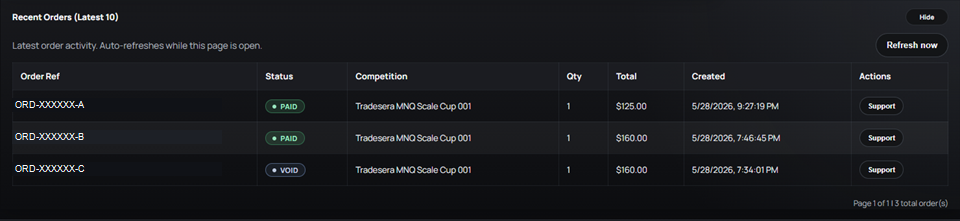
Common Issues
- The order is paid but no credentials appear:
This usually means provisioning is still in progress.
- The account is active but login fails:
Check the Rithmic environment, username, and password. If it still fails, open a ticket from the account row.
- The status has not changed for a while:
Open a support ticket from the order or account row so the exact record is attached.
What To Do Next
Check My Portal first. If the account looks stuck, use the Support button on the related order or account instead of opening a general ticket.
Related Articles
- Where to find your Rithmic credentials
- Rithmic login checklist
- What to do if Rithmic login fails
- Support Hub and ticket history
Related Articles
How to buy a competition entry
How to buy a competition entry Short Answer Log in to My Portal, choose the competition you want, review the checkout summary, and complete payment. After payment, the account still needs to be provisioned before you can trade. When This Applies Use ...Support Hub and ticket history
Support Hub and ticket history Short Answer Use Support Hub in My Portal to create tickets and track support requests. If your question is about a specific order, account, payout, or wallet record, start from that record when possible. Why Context ...Where to find your Rithmic credentials
Where to find your Rithmic credentials Short Answer Your Rithmic credentials appear inside My Portal after the trading account is provisioned and released. If the account is still pending, the credentials may not be available yet. When This Applies ...NQ Showdown overview
NQ Showdown One week. One NQ equivalent. A dynamic winner pool. Start directly in the competition. No evaluation phase. No live funded account path. Just simulated trading, clear rules, and pool-backed payout opportunities. Current offer: Save $200 ...MNQ Scale Cup overview
MNQ Scale Cup Start smaller, earn more size, and request Profit Lock after qualifying performance. Start directly in the competition. No evaluation phase. No live funded account path. Just simulated trading, clear rules, and pool-backed payout ...