Where to find your Rithmic credentials
Where to find your Rithmic credentials
Short Answer
Your Rithmic credentials appear inside My Portal after the trading account is provisioned and released. If the account is still pending, the credentials may not be available yet.
When This Applies
Use this article after you have purchased an entry and want to log in to the trading platform.
Steps
- Log in to My Portal.
- Open Dashboard or Accounts.
- Find the correct competition account.
- Confirm the account status is active.
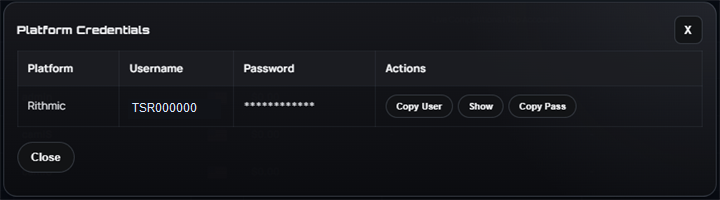
- Select Show Credentials.
- Copy the Rithmic username, password, and environment exactly as shown.
Important Details
Rithmic environments are separate. A username that works in Rithmic Test may not work in paper or live, and the reverse is also true. Use the environment shown in the portal for that account.
Keep your credentials private. Support will never ask you to post a password in Discord or any public channel.
Common Issues
- I do not see Show Credentials:
The account may not be active yet.
- My username works but password fails:
Re-copy from the portal and make sure there are no spaces before or after the password.
- I am logging into the wrong environment:
Confirm whether the account says Rithmic Test, paper, or another environment.
What To Do Next
If the account is active and the credentials still do not work, open a ticket from that account row.
Related Articles
- Rithmic login checklist
- What happens after checkout?
- What to do if Rithmic login fails
Related Articles
Rithmic login checklist
Rithmic login checklist Short Answer Most login issues come from using the wrong environment, copying credentials incorrectly, or trying to log in before the account is active. Before You Contact Support Check these items first: Is the account active ...What happens after checkout?
What happens after checkout? Short Answer Payment is only the first step. After your order is paid, Tradesera prepares the competition account, sends it for Rithmic provisioning, and releases credentials after the account is accepted. When This ...How to buy a competition entry
How to buy a competition entry Short Answer Log in to My Portal, choose the competition you want, review the checkout summary, and complete payment. After payment, the account still needs to be provisioned before you can trade. When This Applies Use ...Frequently Asked Questions
Frequently Asked Questions Use this FAQ for quick answers about Tradesera, competition formats, payouts, billing, account security, and community. For account-specific help, open a support ticket from the trader portal so the support team can review ...Frequently Asked Questions
Frequently Asked Questions Use this FAQ for quick answers about Tradesera, competition formats, payouts, billing, account security, and community. For account-specific help, open a support ticket from the trader portal so the support team can review ...